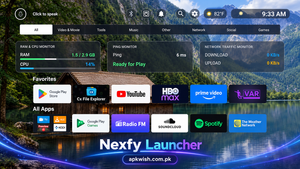
Nexfy Launcher
2 Hours Ago
19.2 MB
v1.2.3
android 6.0+
1 million
Description
Nexfy Launcher is an Android TV home-screen application designed to provide a cleaner and more customizable interface. Instead of changing the main functions of Android TV, the app works as an alternative launcher where users can organize their applications, change backgrounds, access useful information, and create a home screen that better matches their preferences.
The official listing describes the launcher as lightweight and optimized for Android TV hardware. It is also designed to work with standard television remote controls, making navigation easier from a sofa without requiring a touchscreen.
This guide explains its main features, customization options, installation process, benefits, possible limitations, and other useful details before you start using it.
What Is Nexfy Launcher?
Nexfy Launcher is a home-screen replacement created mainly for Android TV devices. A launcher is the part of Android that displays applications, shortcuts, backgrounds, and other information when the device starts or when the Home button is pressed.
Instead of using the standard Android TV layout, users can choose another launcher to create a different viewing experience.
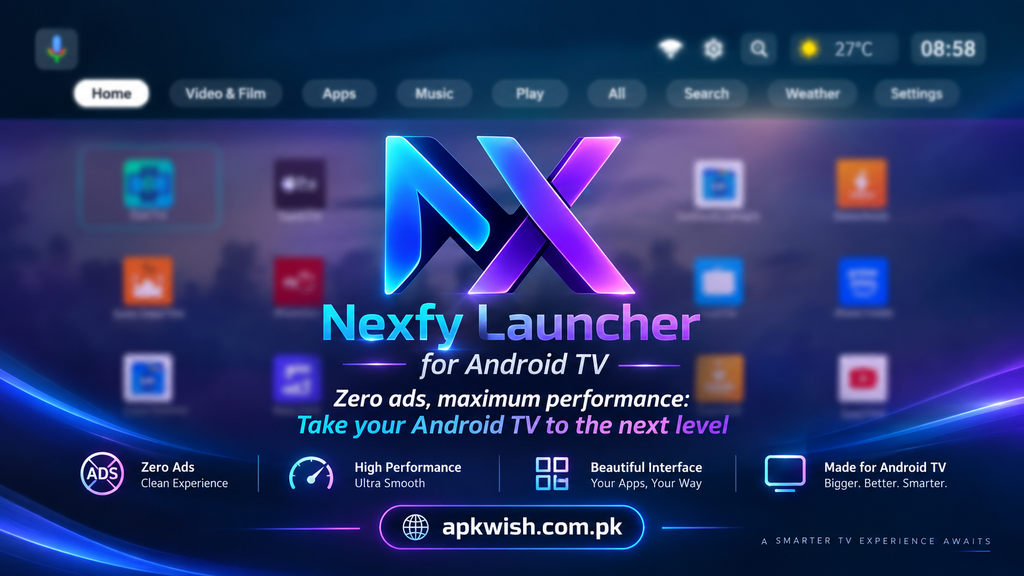
The main purpose of this app is simplicity. It provides a modern TV-focused interface where users can place their frequently used applications in easy-to-reach areas. It also offers different visual customization tools so the home screen does not have to look exactly the same on every device.
Main Features of Nexfy Launcher
Clean and Minimal Home Screen
One of the main attractions of the app is its clean design.
Android TV home screens can sometimes contain many rows, recommendations, banners, or shortcuts. Some users prefer this style, while others simply want quick access to installed applications.
Nexfy provides a more focused layout. Important applications can remain visible while unnecessary sections can be reduced, giving the television screen a simpler appearance.
This may be especially useful for people who frequently switch between only a few streaming, video, music, or utility apps.
Easy App Organization
A good TV launcher should make applications easy to find.
With Nexfy Launcher, users can organize frequently used apps and keep favorites available from the main screen. Instead of moving through several menus every time, commonly opened applications can be placed where they are easier to reach.
This can be useful when several apps are installed on an Android TV box.
For example, a user may want entertainment applications in one area while keeping file managers, browsers, media players, and other tools separately organized.
Lightweight Performance
Performance is important on Android TV because not every television or TV box contains powerful hardware.
Some entry-level devices have limited RAM and processing power. A heavy home-screen application may make navigation feel slower.
The developer describes the launcher as lightweight and optimized to reduce unnecessary resource use in the background. It is intended to provide smooth navigation even on lower-powered Android TV hardware.
Actual performance can still depend on the television model, available storage, installed apps, Android version, and background processes.
Custom Wallpapers
Changing the wallpaper is one of the easiest ways to give a TV interface a new appearance.
The application provides different background options, including static and atmospheric backgrounds. Users can select a visual style that better matches their room, television setup, or personal preference.
A dark background may work well in a bedroom or home theater, while brighter images may look better in a living room.
The background system helps make the home screen feel more personal instead of using the same default interface every day.
Weather Information
Another useful feature is weather information.
The launcher supports weather data from multiple providers, allowing users to see useful weather details directly from their television home screen.
This saves users from opening a separate weather application whenever they only want a quick update.

Availability and accuracy can vary depending on the selected weather provider and location.
Voice and Chat Assistant
The app also includes voice-based controls and an integrated chat assistant.
Voice commands can make television navigation more convenient because typing with a TV remote can be slow. Depending on the available functions and configuration, users can interact with supported launcher features using their remote control.
This type of feature is especially helpful for people who prefer voice navigation over moving through menus manually.
Network Monitoring Tools
People who regularly stream high-resolution video or use cloud gaming services may want to know how their network connection is performing.
The launcher provides network-related tools such as traffic monitoring and ping information. These tools can help users get a quick idea of their connection status without opening a separate network application.
Remember that these indicators are mainly informational. Streaming problems may still be caused by the internet provider, Wi-Fi signal, router, server performance, or the streaming application itself.
TV Remote Support
A launcher made for television needs good remote-control navigation.
Nexfy Launcher is designed around Android TV hardware and standard television remotes. Users can move through different areas of the home screen using normal remote buttons instead of relying on touch controls.
The app also uses Android accessibility functionality for certain remote button actions and custom shortcuts. Users should always review requested permissions before enabling additional system access.
Why Use Nexfy Launcher?
People usually install an alternative Android TV launcher because they want more control over their television home screen.
The default launcher may already work well, but it is normally designed for a wide range of users. An alternative launcher provides another option for people who prefer a more personal interface.
The main reasons someone may consider this launcher include:
- A cleaner home screen
- Faster access to favorite apps
- Custom backgrounds
- Weather information
- Remote-friendly controls
- Network monitoring
- Better organization
- A lightweight interface
The usefulness of each feature depends on how you normally use your television.
How to Download Nexfy Launcher?
The safest approach is to check an official or trusted application source before downloading any Android application.
To install the launcher:
- Open the app store available on your Android TV.
- Search for Nexfy Launcher.
- Check the app name and developer information.
- Read the latest description and permissions.
- Select the Install option.
- Allow the installation to complete.
- Open the launcher after installation.
The app is currently available through Google Play for Android TV.

Avoid installing unknown APK files from random websites because modified packages may contain unwanted changes.
How to Set Up Nexfy Launcher?
After installation, open the application and complete its basic configuration.
- Start by checking the home-screen layout. You can then organize the applications you use most frequently.
- Next, explore the wallpaper section and choose your preferred background.
- If you want weather information, configure the appropriate location and provider settings.
- You can also explore network tools and other available widgets.
- Some Android TV devices may require additional steps before another launcher can fully replace the original home screen. These steps can differ depending on the television manufacturer and Android version.
- Always follow the instructions shown on your own device instead of changing system settings unnecessarily.
Customizing the Home Screen
Customization is one of the biggest reasons to use an alternative TV launcher.
Start with your favorite applications.
- Keep apps you open every day near the main area of the screen. Applications used only occasionally can remain in secondary sections.
- After organizing applications, select a wallpaper that does not make app icons difficult to read.
- You can then decide which widgets or information panels are actually useful.
- Keeping the layout simple usually creates a better TV experience than filling every available area with extra information.
Nexfy Launcher for Low-End TV Boxes
Older Android TV boxes may sometimes struggle with heavy interfaces.
Because this launcher focuses on lightweight operation, it may be worth considering for devices where the standard home screen feels crowded or slow.
However, installing another launcher cannot fix every performance problem.
If your TV box has very little free storage, too many applications running in the background, overheating issues, or an unstable Android installation, those problems may still remain.
Removing unused applications and restarting the device occasionally can also help maintain smoother performance.
Advantages
Nexfy offers several practical benefits for Android TV users.
Its minimalist layout keeps the home screen focused on important apps. Favorite applications can be easier to access, while wallpaper options give users more control over the visual appearance.
Network information may also be useful for streaming users.
Another advantage is that the interface is created specifically with television navigation in mind instead of simply adapting a mobile-phone layout.
Possible Limitations
No launcher will be perfect for every television.
Compatibility may depend on the TV manufacturer, Android version, remote control, and system restrictions.
Some devices also make it harder to permanently replace their built-in launcher.
Certain customization choices or additional features may differ between app versions, so users should check the current listing before installation.
People who are already satisfied with their default Android TV home screen may also have little reason to change it.
Is Nexfy Launcher Safe to Use?
Users should treat a launcher like any other application that receives access to device functions.
Download it from a trusted source, check the permissions being requested, and read the current privacy information before enabling optional features.
The Google Play listing provides information about the developer’s declared data-handling practices and notes that the launcher uses Android accessibility functionality for remote-control button handling.
Permissions and privacy information can change as applications receive updates, so checking the latest details is always recommended.
FAQs
It is an alternative home-screen launcher created mainly for Android TV devices. It allows users to organize apps and customize the appearance of their TV interface.
Its official listing focuses on Android TV hardware rather than normal smartphone home screens.
Yes. The launcher includes options for keeping favorite and frequently used applications easily accessible.
Yes. Users can choose from different background options, including static and atmospheric styles.
Yes. Weather information from supported providers can be displayed through the launcher.
Conclusion
Nexfy Launcher provides Android TV users with another way to control how their television home screen looks and works. Its focus on a clean layout, app organization, wallpapers, weather information, network tools, remote navigation, and lightweight operation makes it useful for people who want an alternative to the standard Android TV interface.
The app can be particularly interesting for users who prefer quick access to their favorite applications instead of navigating through a crowded home screen.
Before installing it, check compatibility with your television, review the latest permissions, and use a trusted download source. After installation, spend a little time arranging your apps and selecting the right background. A simple setup often provides the easiest everyday viewing experience.
Images