Bangladesh App Download Latest Version & Android Guide
2 Hours Ago
21 MB
1.31
Android 6.0+
21K+

Description
Learning about a country often means moving between history articles, travel pages, and photo galleries. The Bangladesh app by ArtisanApps brings several of these topics into one Android application.
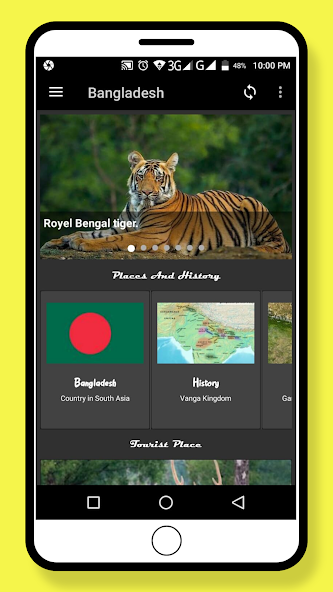
Its description covers history, geography, culture, tourist places, and other country information. It also includes image browsing and wallpapers, giving readers a visual way to explore alongside the written content.
The app may suit someone who wants a general introduction or a reference to browse in spare moments. However, use current sources for information that changes, such as travel arrangements, population figures, and government details.

What Is the Bangladesh App?
The Bangladesh App is an Android information and travel application from ArtisanApps. It introduces different aspects of the country through written material and images.
The developer lists topics including history, geography, administration, economy, education, transport, religion, and sports.
It also advertises tourist-place information, a zoomable gallery, image previews, and offline use.
Think of it as a starting point for learning and browsing. Its listing does not establish that it provides live navigation, hotel booking, or current travel alerts.
Learn About History and Geography
History and geography give readers a useful starting point. They help connect places with the events, landscapes, and communities associated with them.
When exploring these topics, begin with one subject rather than trying to read everything at once. For example, read a historical overview, then look at the location connected to it.
This approach makes the information easier to follow. It also gives you questions to explore further through books, museums, or other reliable resources.
For schoolwork, check important dates and claims against the sources your teacher recommends.
Explore Tourist Places
The app’s description includes tourist destinations and information about places. That can help readers build an initial list of locations they want to learn about.
However, discovering a destination and planning a visit are separate tasks.
Before travelling, confirm:
- Whether the location is open
- Current visiting hours
- Entry charges, if any
- Transport options
- Local access conditions
- Any booking requirements
An older description can still explain why a place matters, but it may not reflect today’s arrangements.
Therefore, use the app for ideas and background information, then check practical details closer to your visit.

Read About Culture and Everyday Life
A country guide becomes more useful when it looks beyond landmarks. Topics such as culture, education, sports, and transport can help readers understand everyday life.
Take your time with unfamiliar terms. If a short description raises a question, make a note and explore the subject further.
Also, remember that a brief app entry cannot represent every community or personal experience. Treat general descriptions as introductions rather than complete accounts of how everyone lives.
This mindset helps you learn without expecting one application to explain an entire country.
Browse the Gallery and Wallpapers
The developer advertises a zoomable image gallery, wallpaper browsing, and image previews.
Photos can help you connect a written description with a place or subject. Meanwhile, previewing an image lets you check how it looks on your phone before choosing it as a background.
When browsing, pay attention to the image description where one is available. A picture alone may not explain when or where someone took it.
For wallpapers, check the crop and readability. A detailed background may look attractive but make home-screen icons harder to see.
Offline Access
The app description states that it works offline and includes wallpapers without a separate download.
That may be useful when you want to read without relying on mobile data. Still, test the sections you need before depending on them during a journey.
A Simple Offline Check:
- Install and open the app.
- Visit the sections you plan to use.
- Disconnect from the internet.
- Reopen those sections.
- Check whether text and images remain available.
This confirms what works on your installed version. Updates and any connected services may still need internet access.

Bangladesh App Download and Installation
For a Bangladesh App Download, search Google Play using both the app name and ArtisanApps. The word “Bangladesh” alone can return many unrelated results.
Follow these steps:
- Open Apkwish.com.pk on your Android phone.
- Search for the app and developer.
- Compare the screenshots and description.
- Check compatibility and available storage.
- Tap Install.
- Open the app and explore a few sections.
- Review any permission prompts before accepting.
Google Play handles the installation directly. You do not need to enable installation from unknown sources when using the store.
If you search for Bangladesh APK, confirm that the file belongs to the intended developer. An APK filename alone does not establish its identity.
Android Compatibility and Storage
The supplied details show Android 5.1 or later as the requirement. They also report compatibility with Vivo V2025 and TECNO CK6n devices.
However, that device list reflects checks for the account shown in the supplied information. It does not guarantee compatibility with every phone.
For your own device, review the current store result. Also, leave some storage beyond the stated download size so Android has room to complete installation.
If installation fails, check the displayed message before trying again. It may identify a storage, compatibility, or connection problem.
Who Might Find This App Useful?
The app may interest readers who want an introduction to the country, students exploring general topics, or people looking for travel ideas.
It may also appeal to users who enjoy country photographs and themed wallpapers.
However, it should not be your only source for current affairs or detailed trip planning. The supplied update date is from 2024, so time-sensitive information deserves a fresh check.
Use it to discover a topic, then investigate further when accuracy or current conditions matter.
Pros and Cons
Pros
- Several country-information topics in one app
- Tourist-place content for initial browsing
- Gallery and wallpaper features
- Advertised offline access
- A listed download size of about 21 MB
Cons
- Contains advertising
- Some information may need updating
- Device compatibility varies
- General descriptions cannot replace detailed research
- Offline content does not provide live travel conditions
Tips for Getting More Value From the App
Start with a topic that interests you. Reading one useful section carefully is better than quickly opening every menu.
Next, note places or subjects you want to revisit. You can keep these notes separately if the app does not offer a saving feature.
Finally, check the date and context of information before using it in an assignment or travel plan. This helps you separate useful background material from details that may have changed.
Conclusion
The Bangladesh app by ArtisanApps offers a place to browse country information, tourist subjects, and images on Android.
Its appeal lies in bringing several topics together with advertised offline access. Use it for an introduction, then confirm important facts and current travel details through appropriate sources.
FAQs
It provides information about the country, including history, geography, culture, and tourist places, alongside image and wallpaper features.
ArtisanApps publishes the application covered in this guide.
The developer advertises offline access. Test the sections you need after installation.
The supplied listing states Android 6.0 or later. Check the current store listing for your device.
Yes. Its Google Play listing identifies it as an app that contains ads.