
TruckMap APK Download (GPS & Parking Guide) for Android 2026
2 Hours Ago
67.2 MB
8.0.18
Android 6.0+
35K+

Description
A truck driver needs more than directions to an address. The route must suit the vehicle, and the journey may require fuel, parking, a weigh station, or a repair stop. Finding those details separately can take time before a trip even begins.
TruckMap brings truck navigation and roadside location searches into one mobile app. It helps commercial drivers plan routes using vehicle details and find useful stops along the way.
The app also lists parking, driver facilities, and freight opportunities. However, good planning still matters. Review the route before departure, check important stop details, and always follow road signs and current restrictions.
What Is TruckMap?
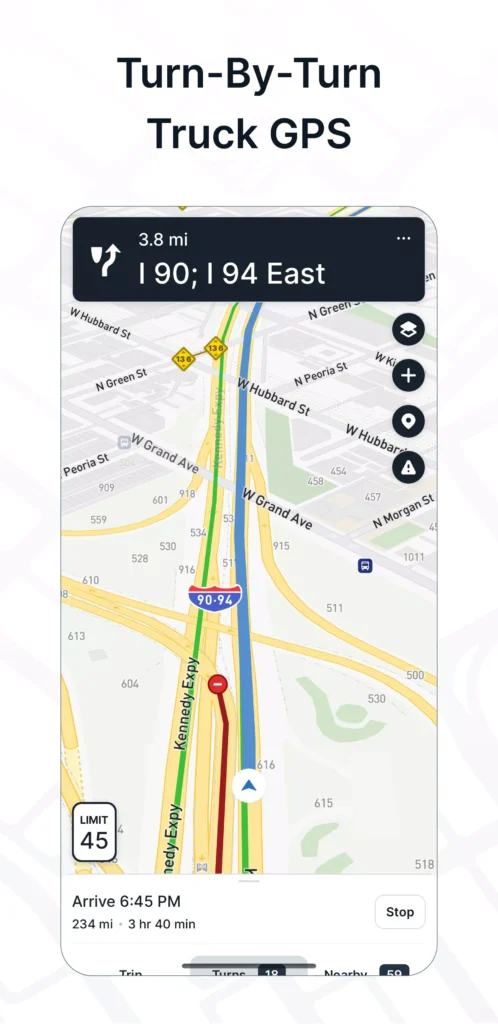
TruckMap is a mobile navigation app built for truck drivers. Its published features include truck-specific routes, turn-by-turn directions, fuel locations, parking searches, and service listings.
The TruckMap App lets drivers enter details such as truck height and weight. These settings help the routing system account for restrictions that may affect a commercial vehicle.
It also brings practical journey information together. Instead of searching separately for a shower, diesel pump, and overnight stop, you can use location filters to narrow your options.
The app is available for Android and iPhone. On Google Play, the publisher appears as Tenstreet.
How TruckMap GPS Routing Works
TruckMap GPS uses the vehicle information you provide when preparing a route. The app advertises routing that considers truck restrictions, including weight limits, low clearances, and hazardous materials restrictions.
Start by checking your vehicle profile. An incorrect height or weight can undermine the usefulness of a truck route.
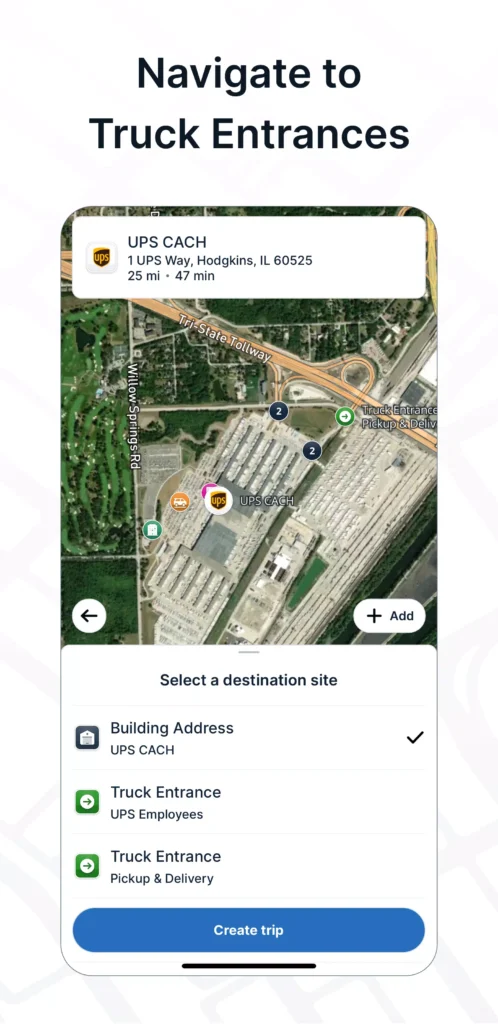
Then enter your destination and review the suggested journey. Pay particular attention to the final approach, where a street address may differ from the truck entrance.
Set Your Truck Height and Weight
Use accurate information for the vehicle and load you are operating. Also, check the units before saving the profile.
If you change equipment, revisit these settings. A profile that suited yesterday’s vehicle may not suit today’s combination.
Review Toll Preferences
The app includes an option to avoid toll roads. This can help you compare routes, but a toll-free journey is not automatically the most practical choice.
Consider distance, travel time, road suitability, and delivery needs together. Review the complete route rather than judging it only by toll cost.
Follow Posted Restrictions
Navigation information can become outdated or miss temporary changes. If a sign, closure, or authorised instruction conflicts with the app, follow the current road information.
Never continue towards an unsuitable road simply because the map recommends it.
Find Truck Stops Along Your Route
A useful stop needs to offer the services you actually need. A fuel location may suit a quick refill, while a longer break may require parking, food, showers, and laundry.
TruckMap’s location listings include major chains such as Pilot Flying J, Love’s, Petro, TA, Roady’s, and AM Best, alongside other facilities.
However, services differ between locations. Check the individual listing instead of assuming every stop within a chain offers the same amenities.
Useful Details to Review:
- Truck access and entrance location
- Fuel and DEF availability
- Parking information
- Opening hours
- Showers and restrooms
- Food, laundry, and other services
For an essential stop, confirm important details directly with the facility.
Overnight Truck Parking
Finding parking deserves attention early in the journey. Waiting until the last moment can leave you with fewer practical options.
The app advertises more than 400,000 truck parking spots. Treat this as a directory figure, rather than a count of spaces available right now.
A listed parking area does not guarantee an empty space, permission to stay overnight, or room for your particular vehicle.
Plan a Main Stop and a Backup
Choose a preferred parking location before departure. Then identify another suitable option in case the first one is full or unavailable.
Check access, parking rules, and any booking requirements before relying on either location.
Check Store Parking Permission
TruckMap includes Walmart locations among its facilities. However, a store appearing on the map does not mean it permits truck parking.
Ask the location about its current policy and follow posted instructions. Local conditions and property rules may affect whether you can stop there.
Diesel Fuel and Other Fuel Services
Fuel planning involves more than locating the nearest pump. Drivers also need to consider access, opening hours, and the services available on site.
TruckMap lists filters for diesel, biodiesel, propane, and DEF facilities. These can help narrow a search to locations that match your needs.
Before adding a fuel stop, check how it fits into the route. A location nearby on the map may require an awkward approach or a significant detour.
Also, do not assume that every fuel listing includes current prices. Confirm pricing and availability when those details matter to your decision.
Weigh Stations, Scales and Rest Areas
The app includes listings for weigh stations, DOT inspection sites, rest areas, and CAT scales.
These locations serve different purposes. A rest area provides a place to stop, while a scale facility may help you check vehicle weight. Inspection sites involve separate requirements.
Use the map to understand where facilities lie along the journey. However, do not treat a map listing as proof that a weigh station is open or closed.
Follow roadside instructions and the requirements that apply to your vehicle.
Search for the Amenities You Need
Location filters can reduce the time spent opening unsuitable listings. Start with the service you need most, then add other preferences.
For example, you might first look for overnight parking and then check whether the location also offers showers and laundry.
Listed Filter Options Include:
- Daytime, overnight, and HAZMAT parking
- Truck washes
- Convenience and grocery stores
- Restrooms and showers
- Laundry and Wi-Fi
- ATMs and air hoses
- Locations open around the clock
Avoid applying so many filters that you hide useful alternatives. If results become limited, relax a less important preference and compare nearby options.
Truck Repairs and Roadside Services
TruckMap also lists services such as tyre work, oil changes, truck mechanics, towing, and roadside assistance.
When contacting a provider, explain the vehicle type, location, and problem clearly. Then ask whether they can handle the work and when they can attend.
A nearby listing does not guarantee immediate service. Confirm availability and charges before arranging assistance.
For planned maintenance, check opening hours and appointment requirements in advance. This helps avoid a wasted stop during a busy delivery schedule.
Freight Broker Marketplace
TruckMap advertises a freight marketplace with booking, bidding, and carrier onboarding features. Its description also mentions headhaul and backhaul opportunities.
For drivers or operators seeking another load, this adds a separate planning tool alongside navigation.
However, a high advertised rate per mile does not tell the whole story. Review the pickup location, delivery schedule, equipment requirements, empty miles, and load terms before accepting work.
Marketplace access and available freight may depend on your location, account, and carrier eligibility. Check the current options inside the app rather than assuming every load is available to every user.
Shipping Facility Reviews and Driver Feedback
Driver feedback can provide context that a basic address lacks. For example, comments may describe an entrance, parking arrangement, or experience at a shipping facility.
Still, check when someone posted the review. A business may change its procedures, hours, or access arrangements.
Use reviews to prepare useful questions, then confirm important instructions with your dispatcher or the facility. A driver’s previous experience should not override your current delivery information.
TruckMap Download and Setup
For a TruckMap Download, use your device’s app store and check that you have selected the intended product. Similar names can lead to different applications.
Getting Started:
- Search for “TruckMap – Truck GPS Routes.”
- Check the game publisher and app description.
- Review device compatibility.
- Install and open the app.
- Complete any required setup.
- Enter accurate truck details.
- Review location and navigation settings.
- Plan a familiar route before using it on a new journey.
Complete setup while parked. Also, test the navigation audio so you know whether you can hear directions clearly.
Practical Tips for Daily Use
Before each trip, confirm the destination, truck profile, and planned stops. Pay extra attention when you change vehicles or carry a different load.
Review the last part of the journey before departure. The correct truck entrance can matter as much as the main highway route.
Keep a backup parking option and confirm essential facility details. Finally, stop safely before editing routes, reading reviews, or searching for another location.
These habits make the app more useful without asking it to replace your judgement.
Final Thoughts
TruckMap combines commercial vehicle routing with searches for parking, fuel, facilities, and truck services. That makes it a practical place to begin planning a journey.
Its value depends on accurate vehicle settings and careful route review. Use the available information to prepare, then confirm important details and respond to the conditions you find on the road.
FAQs
The publisher describes it as a free truck navigation app. Fuel, parking, repairs, and other services you find through it may carry separate charges.
Yes. The app lists customisable height and weight settings for truck routing.
No. A listed location does not guarantee live availability or permission to park overnight.
Yes. Its published location filters include diesel fuel, showers, and several other driver amenities.
No. Always follow posted restrictions, closures, and authorized instructions, even when they differ from the suggested route.
